Features NFC EMV Explorer
The app can be used by general public, to research their contactless cards and find if their privacy is at risk (a subset of NFC EMV cards do disclose personal data).The app is a research tool for professionals implementing open-loop contactless ticketing systems, such as public transits, movie theaters, or zoos.Tap a contactless NFC EMV card and analyze APDU transceive latencies, to optimize the gateway ticket validation throughputs and minimize risks.
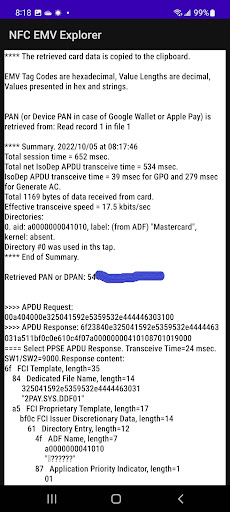
You will see that tap summary like this:**** Summary.
2022/11/11 at 15:15:26 Total session time = 703 msec.
Total net IsoDep APDU transceive time = 570 msec.
IsoDep APDU transceive time = 169 msec for GPO and 178 msec for Generate AC.
Total 1046 bytes of data received from card.
Effective transceive speed = 14.7 kbits/sec Directories: 0.
aid: a00000038410, label: "eftpos SAV", kernel: absent.
1.
aid: a0000000041010, label: "Debit Mastercard", kernel: absent.
Directory #1 was used in this tap.
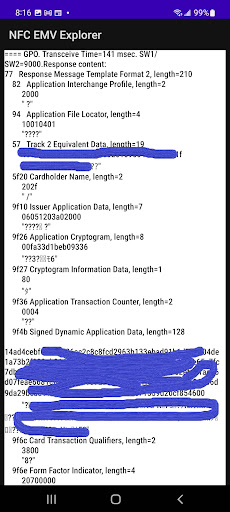
**** End of Summary.You will also see APDU outputs for the following commands: - Select PPSE “2PAY.SYS.DDF01”, - Select Application ID (ADF), - Get Processing Options (GPO) issued with a valid PDOL, - Read Record for all records specified in the Application File Locator (AFL),- Generate Application Cryptogram (AC) when applicable, issued with a valid CDOL1.
This one is useful for assessing the card’s Offline Data Authentication (ODA) capability.The output data is presented in EMV Tag structured form.Apart from regular plastic cards, you can explore virtual cards in Google, Apple Pay, etc.
wallets in phones and watches.The app works with multi-application cards, processing another directory entry EMV Tag 61, in each next tap.Tested schemes: Visa, Mastercard; Interac, eftpos (Australian).
AmEx is partially tested.This app is protected against using it for card data pickpocketing.
Before the data is exposed to you, you must enter the last 4 digits of the card number (PAN or Device PAN/Info).The app does not require any Android permissions.
Hence, it cannot store or upload any data.
The app copies the card data to the clipboard.
So, you can discard it or paste it to any application you trust (e.g., email).**** Dont forget to enable NFC in your Android settings and charge your phone well.If you can try free NFC EMV Explorer - Entry Level, presenting limited data:https://play.google.com/store/apps/details?id=com.wwopenfare.freereadnfccard
Gaming Features
Enjoy immersive gaming experience with various game modes.
Financial Tools
Manage your finances and track your expenses easily.
Food & Dining
Discover recipes and order food from your favorite restaurants.
See the NFC EMV Explorer in Action

Get the App Today
Available for Android 8.0 and above